Hello and welcome back to this blog! Today I’m going to explain what the differences are that exist between interfaces and abstract classes. This is a topic I’m honestly still grappling with; I understand they’re different but when I try to explain it I start to get my words tied up. I’m going to definitely link to a few outside sites that explain it much better at the bottom of this blog, so if I don’t seem to be making sense at any time; maybe go take a peek at one of those and come back to finish my rambling?
Before we talk about the differences between these concepts, we should actually define them. This is actually easier said than done as the differences are what help one define them. Confused? Me too, let’s keep going! One huge common trait between the two to keep in mind is that both cannot be instantiated. So if that’s what they have in common, what’s the differences?
- Abstract classes can have both abstract and non-abstract methods while interfaces can only have abstract methods.
- Abstract classes can have both final and non-final variables while variables declared in an interface are by default final
- Abstract classes allow for access modifiers while everything declared in an interface is public by default
- Abstract classes can use constructors while interfaces cannot
- As a general rule. interfaces tend to run slower than abstract classes
- Abstract classes can inherit only one class while interfaces can inherit from as many as needed
There are more differences, but hopefully by now you can see the difference. Now let’s see it in action! I’ve coded essentially the same code as both an interface and an abstract class. My example is basically based around Mario Party 3 computer player behavior.

First let’s run through an abstract class code. Here is the implementation of an abstract class.
abstract class Player {
    public abstract void playerStyle();

    public void takesDamage() {
      System.out.println("Oof!");
    }

    public void victory() {
      System.out.println("I win!");
    }

    protected void score() {
      System.out.println("I can't show you!");
    }
  }
As you can see our abstract class is named Player. It has the abstract method playerStyle which has no body and three regular methods; takesDamage, victory and score. Take note: score is a protected method; this is allowed in an abstract class. Next we’ll have a couple of classes that inherit from Player.
class Mario extends Player {
    public void playerStyle() {
      System.out.println("Mario goes after Mushrooms");
    }

    public void victory() {
      System.out.println("Yahoo! Mario's the winner!");
    }
  }

  class Luigi extends Player {
    public void playerStyle() {
      System.out.println("Luigi loves Skeleton Keys");
    }

    public void victory() {
      System.out.println("Yeah! Luigi's the SuperStar!");
    }
}
In both our new classes Mario and Luigi, we’ve defined the abstract method playerStyle as well as giving victory it’s own unique response for either. Next we’ll actually use these classes in our main method to run these methods in instances of their classes.
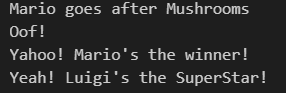
class MyAbstractClassDemo {
    public static void main(String[] args) {
      Mario myMario = new Mario();
      myMario.playerStyle();
      myMario.takesDamage();
      myMario.victory();
      Luigi myLuigi = new Luigi();
      myLuigi.victory();
  }
Next we’ll walk through the interface version of this code. Let’s define our interface!
interface Player {
    public void playerStyle();
    public void takesDamage();
    public void victory();
  }

interface ShortLegs {
    public void superSlow();
  }
Wow! Sure looks different from the abstract class doesn’t it? Remember that all methods in an interface need to be abstract. I can’t define any of my methods in an interface. Also take note that all the methods are public; as soon as I even dared to state a method as protected here, my IDE threw me an error. Also wait–what’s that ShortLegs interface doing there, you ask? Patience! Moving right along, we’ll make our Mario and Luigi classes again!
 class Mario implements Player, ShortLegs {
    public void playerStyle() {
      System.out.println("Mario goes after mushrooms");
    }

    public void takesDamage() {
      System.out.println("Oof");
    }

    public void victory() {
        System.out.println("Yahoo! Mario's the winner!");
    }
    public void superSlow() {
      System.out.println("He's slow.");
    }
  }

  class Luigi implements Player {
    public void playerStyle() {
      System.out.println("Luigi loves Skeleton Keys");
    }
    public void takesDamage() {
      System.out.println("Oof");
    }

    public void victory() {
        System.out.println("Yeah! Luigi's the SuperStar!");
    }
  }
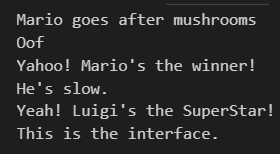
Since all our methods are abstract, I needed to define all my methods in each class with their own messages. Hm, what’s that? Oh you see that ShortPlayer popping up again? Ah yes, let’s talk about that now! If you recall, classes can inherit from as many interfaces as needed. My new ShortPlayer interface only applies to one of the plumber brothers: Mario. He’s short. The Mario class here is not only getting methods from the interface Player but ShortPlayer as well. Okay, so let’s see how the main method looks with our interface and what output we get:
class MyDemo {
    public static void main(String[] args) {
      Mario myMario = new Mario();
      myMario.playerStyle();
      myMario.takesDamage();
      myMario.victory();
      myMario.superSlow();
      Luigi myLuigi = new Luigi();
      myLuigi.victory();
    }
  }
In conclusion, this has been a quick, if not nerdy, run through on the basics and differences between abstract classes and interfaces. Here are the github links for the complete code examples I used: https://github.com/salkiduckyJUMP/RLHull-Repo/blob/master/DemoAbstractClass/MyAbstractClassDemo.java and https://github.com/salkiduckyJUMP/RLHull-Repo/blob/master/DemoInterface/MyDemo.java
I’m definitely not the first one to write this kind of post and I actually used a few of them while researching this topic, so here is that promised list of links from earlier. Happy learning and happy exploring!
- https://www.w3schools.com/java/java_abstract.asp
- https://www.w3schools.com/java/java_interface.asp
- https://javapapers.com/core-java/abstract-and-interface-core-java-2/difference-between-a-java-interface-and-a-java-abstract-class/
- https://www.guru99.com/interface-vs-abstract-class-java.html
Let me know what you’d might want to use an abstract class or interface for in the comments; I quickly got tired of the animal sounds example that everyone and their brother seems to use.

 Rebecca Hull's Wordpress