As part of your coding experience, you might be asked to use Github. Github, speaking from experience, can be pretty scary for those unsure of how you interact with it–and opening a Git Bash or other command line to do that won’t instill a comforting feeling. For myself, I’ve spent my whole-technology-connected-life navigating through the GUI(graphical user interface) of Windows to find files and programs I want to open so the text-commands to use Git were kind of scary. One wrong line and you could delete things or put them in the wrong section. Eep!
Take a deep breath–relax. Once you get to used to the various commands used to access your data, it’s not such a giant hoop to jump through. Let’s start with two of the more basic ones just to give you an example.
git init [repository name]The above command is init which initializes or reinitializes a new repository. Let’s see it in action! Here you’ll see my repository folder on my computer to the left and my Git Bash on the right, also in my repository folder. What do you think will happen when I hit enter on Git Bash?
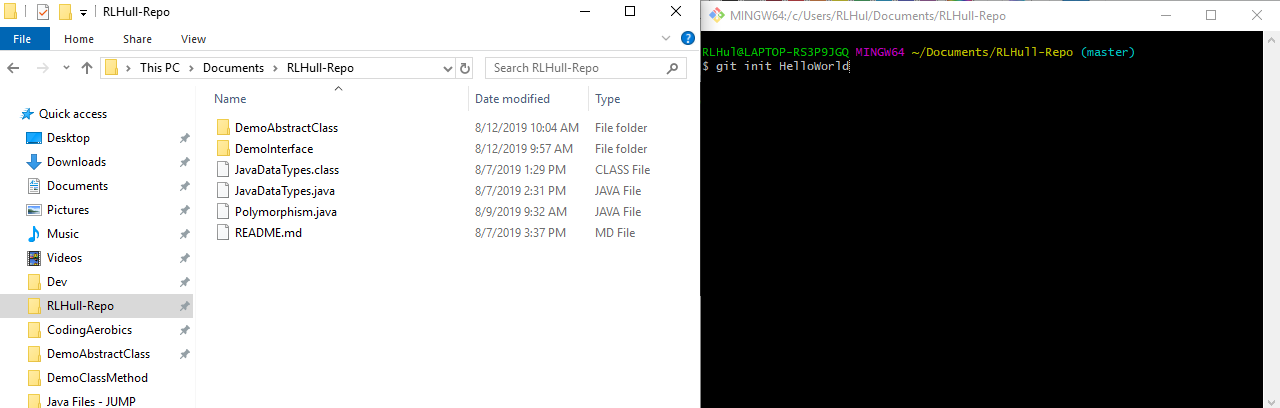
Let’s see if you’re right!
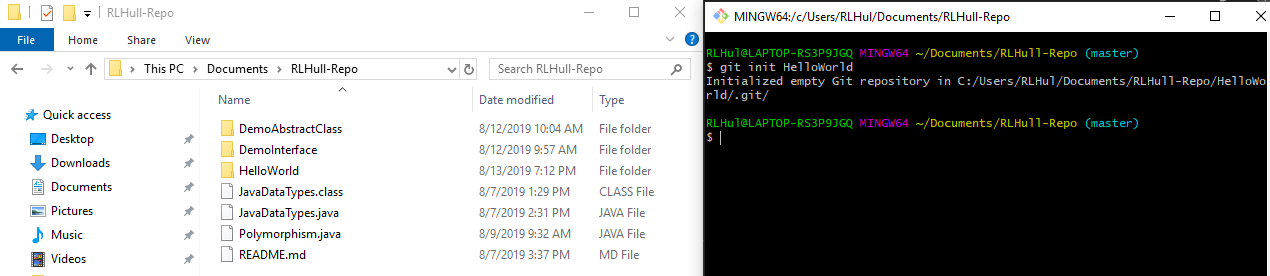
If you guessed that my repo would suddenly have a new folder in it called HelloWorld, you’re correct! Upon clicking on such a new repository, it may seem as if it’s an empty folder, but that is not the case. Windows hides some more complicated files in file explorer to keep users from messing with them, but navigating within Git Bash will show you the truth: there is a .git directory with sub-directories for objects, refs/heads, refs/tags and template files. That’s pretty much the general idea of git init. Onward!

git clone [Url Here]Hey, isn’t Github a nifty site? You can see repositories on almost anything and everything coding wise. You can open any code file and check it out in your personal IDE to fiddle with, but…That’s a little time consuming. What if you could just ‘pop’ a repository into your local repository without all that extra work? Git clone is actually what you’re looking for! For example, let’s say you wanted to clone my repository of Java code examples. Navigate into any repository on Github and you’ll see a green button to the far left that says ‘Clone or download’. Clicking that button produces a small menu with the url to the git file. Copy it and then in your GitBash you simply type:

git clone https://github.com/salkiduckyJUMP/RLHull-Repo.gitWhen you hit enter, you’ll see you now have a copy of the linked repository in your local repository! Try it out with the above command to get my repo.

 Rebecca Hull's Wordpress