It was possibly not my best move to jump into the explanation of a SQL keyword on my first post regarding databases, so let’s take a step back and really analyze some general facts surrounding databases.
What is a Database?
a structured set of data held in a computer, especially one that is accessible in various ways.
Google Dictionary
Database is a systematic collection of data
Guru99
That’s what a few sources say about databases; what do I say? Essentially both these definitions are correct. You’ve probably accessed, come across and even be a part of a database dozens of times without realizing it, in fact. Ever log into a website? Extremely likely if you’ve found yourself here–the website likely has a database of users who have a username and a corresponding password. When you log in, the website needs to check with the server to make sure you’re using the correct credentials for the account you’re trying to log into. Essentially you can think of the website itself, as in the part you access and see, as the front end and on the back end the database lives full of data that’s pulled by the website to show you certain results.
Tables; Can’t Live Without Them
A database can have many different tables. So what is a table? It’s a collection of related data. It’s essentially how the database stores and organizes data. Let’s look at one.
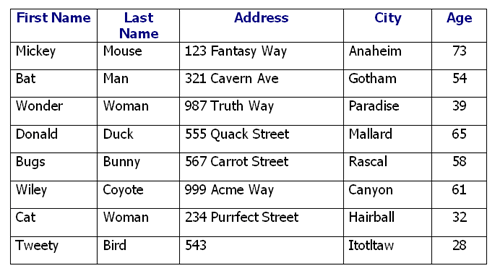
In this case, it’s a table containing information on fictional characters, including their names, addresses and age. Each of these columns is an attribute. On the other hand each row is a record, commonly referred to in the database world as a tuple. The third row can be read that the record has the value Wonder for the First Name attribute, the value Woman for the Last Name attribute, 987 Truth Way for the Address attribute and so on.
Schemas; The Backbone of Your Database
A schema is another important thing to keep in mind when looking at databases. You can think of a schema as the frame of a house you’re building. When you’re building a house, the frame shows where the windows are, the doors, how far apart they are, how tall the walls are and other information about the structure. In the same way the schema can show the organization and structure of your database.
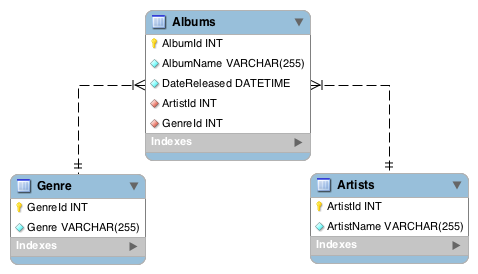
A schema can contain tables, columns, data types, views, stored procedures, and so on. It’s okay if you don’t know what all these terms mean if you’re a beginner to databases. It’ll all come with time–maybe down the road I’ll write more about schema-objects.
Entity Relationship Model
Falling in line with the Entity Relationship Model, data is viewed as entities, attributes and relations that exist between those entities. Entities can be related to real-world objects that are distinguishable from other objects; such as people(relatively speaking) in our table example above. Entities are described by using their attributes, such as First Name in our table above. The relationship is simply the two-dimensional table but more so it is a link that relates one or more entities that share one or more tables.
ER design model is important to keep in mind as it’s the model followed by relational database management systems like MySQL which help to create and manage databases!
Relationship Types
Your relationship is ___ if ….
- One to One: If a record from table one can only be related to one item from table two; like a person can only have one social security number and a social security number can be tied to only one person.
- One to Many: If a record from table one can be related to many items from table two; like a person can be the owner of many dogs and many dogs can have the same owner.
- Many to Many: If many records from table one can be related to many records from table two, like multiple authors can write multiple books and multiple books can be written by multiple authors. Note that ‘many’ in this definition just means more than one.

 Rebecca Hull's Wordpress