- What is MongoDB?
- MongoDB, classified as a NoSQL database, is a document based database which provides high performance, high availability and easy scalability.
- Compare traditional relational databases like SQL to MongoDB.
- Relational databases are powerful and flexible but constrained; they were designed with database administrators in mind.
- NoSql databases were designed with programmers in mind, where the document model more closely match code objects.
- While creating a Schema in MongoDB what are the points that need to be taken in consideration?
- Points that need to be taken in consideration are
- Design your schema according to user requirements
- Combine objects into one document if you use them together. Otherwise, separate them
- Do joins while write, and not when it is on read
- For most frequent use cases optimize your schema
- Do complex aggregation in the schema
- Points that need to be taken in consideration are
- What is indexing?
- Indexes are special structures in MongoDB, which stores a small portion of the data set in an easy to traverse form. Ordered by the value of the field specified in the index, the index stores the value of a specific field or set of fields.
- Describe some features of indexing supported by MongoDB.
- MongoDB allows for up to 64 indices per collection
- The single field index makes it faster to access and query that specific field. Helpful for when a specific field is going to be queried very often.
- The compound index is a single index that uses multiple fields to create a lookup table to make a wide range of queries.
- MongoDB also allows for uniqueness rules via indexing; can create this index before creating objects to force these rules onto objects.
- What is sharding?
- Sharding is a procedure where data records are stored across multiple machines. It provides scalability via software rather than an expensive solution that would be needed in relational databases like SQL. Sharding is the horizontal partition of data in a database or search engine. Each partition is referred to as a shard or database shard. It can be challenging to set up Sharding, but it makes it possible to manage large databases without paying for larger systems for the data size to expand.
- What is replication?
- Replication is a process of synchronizing data across multiple servers, ensuring reliability and availibility of the data. With replication, you keep multiple copies of data on different database servers. It protects the database from going down based on a single server going down with the use of replica sets.
- What is a replica set?
- A replica set is a group of instances that host the same data set. In the replica set one node is primary and another is secondary. From primary to the secondary node, all data replicates.
- If your primary server goes down, another server will automatically be promoted to be the new main server. When the original primary server comes back up, it will take its place as a secondary server.
- A replica set is a group of instances that host the same data set. In the replica set one node is primary and another is secondary. From primary to the secondary node, all data replicates.
- What is aggregation?
- Aggregations are operations that process data records and return computed results.
- Compare Update and Set queries.
- Update replace entire object and set only the values specified in the query. It completely overwrites the original.
- Set is generally used more often than Update because it supports a partial update and not leave unspefied values empty, instead using the original values of the object for them.
- What are some advantages of embedded data structure?
- MongoDB supports nested arrays and objects rather than simply keys and values. It supports operation at any depth of nesting even up to 100 levels. Embedded data in MongoDB can be easier to work with, minimizes coding operations and is easier to query and index. One downside is that it won’t update values automatically across documents.
- What are some advantages of the include by references structure?
- References allow you to address each collection separately. It can protect you from having to update the same data in multiple places therefore enabling consistent data.
- What is the ObjectId–what is it made of?
- ObjectId is the default primary key for a MongoDB document
- Objectld is composed of
- Timestamp
- Client machine ID
- Client process ID
- 3 byte incremented counter
- Objectld is composed of
- ObjectId is the default primary key for a MongoDB document
- How does MongoDB store objects in the collection?
- MongoDB stores BSON (Binary Interchange and Structure Object Notation) objects in the collection.
- What is the syntax to create a collection and to drop a collection in MongoDB?
- Syntax to create collection in MongoDB is db.createCollection(name,options)
- Syntax to drop collection in MongoDB is db.collection.drop()
Blog Feed
Angular Interview Questions
- Why is Angular?
- Angular is an open-source front-end web framework that provides a platform for easy development of web-based single page applications (SPAs) and empowers developers in curating cross-platform applications. It integrates features like declarative templates, dependency injection and various other best practices that smoothens the development path.
- What are the advantages of using Angular?
- It supports two-way data-binding
- It follows MVC pattern architecture
- It supports static template and Angular template
- You can add a custom directive
- It also supports RESTful services
- Validations are supported
- Client and server communication is facilitated
- Support for dependency injection
- Has features like Event Handlers, Animation, etc.
- Are there any disadvantages?
- Complex SPAs can be inconvenient and laggy to use due to their size
- Dynamic applications do not always perform well
- Learning Angular requires a decent effort and time
- What are components in Angular?
- Components are like the basic building block in an Angular application. Components are defined using the @component decorator. A component has a selector, template, style and other properties, using which it specifies the metadata required to process the component.
- What is data binding?
- In Angular, data binding is one of the most powerful and important features that allow you to define the communication between the component and DOM(Document Object Model). It basically simplifies the process of defining interactive applications without having to worry about pushing and pulling data between your view or template and component. In Angular, there are four forms of data binding:
- String Interpolation
- Property Binding
- Event Binding
- Two-Way Data Binding
- In Angular, data binding is one of the most powerful and important features that allow you to define the communication between the component and DOM(Document Object Model). It basically simplifies the process of defining interactive applications without having to worry about pushing and pulling data between your view or template and component. In Angular, there are four forms of data binding:
- What is string interpolation in Angular?
- String interpolation in Angular is a special syntax that uses template expressions within double curly {{ }} braces for displaying the component data. It is also known as moustache syntax. The JavaScript expressions are included within the curly braces to be executed by Angular and the relative output is then embedded into the HTML code. These expressions are usually updated and registered like watches, as a part of the digest cycle.
- What are expressions?
- Angular expressions are code snippets that are usually placed in binding such as {{ expression }} similar to JavaScript. These expressions are used to bind application data to HTML
- Syntax: {{ expression }}
- Angular expressions are code snippets that are usually placed in binding such as {{ expression }} similar to JavaScript. These expressions are used to bind application data to HTML
- What are directives?
- A core feature of Angular, directives are attributes that allow you to write new HTML syntax, specific to your application. They are essentially functions that execute when the Angular compiler finds them in the DOM. The Angular directives are segregated into 3 parts:
- Component Directives
- Structural Directives
- Attribute Directives
- A core feature of Angular, directives are attributes that allow you to write new HTML syntax, specific to your application. They are essentially functions that execute when the Angular compiler finds them in the DOM. The Angular directives are segregated into 3 parts:
- On which types of the component can we create a custom directive?
- Angular provides support to create custom directives for the following:
- Element directives − Directive activates when a matching element is encountered.
- Attribute − Directive activates when a matching attribute is encountered.
- CSS − Directive activates when a matching CSS style is encountered.
- Comment − Directive activates when a matching comment is encountered
- Angular provides support to create custom directives for the following:
- What are pipes?
- Pipes in Angular can take in data, run some logic and transform it to produce a new output. Pipes are essentially the same idea as a filter; it changes data in a reusable way without having to modify data for solely an appearance-based purpose.
- What is the difference between annotations and decorators in Angular?
- In Angular, annotations are used for creating an annotation array. They are only metadata set of the class using the Reflect Metadata library.
- Decorators in Angular are design patterns used for separating decoration or modification of some class without changing the original source code
- What is the HttpClient?
- The
HttpClientin@angular/common/httpoffers a simplified client HTTP API for Angular applications that rests on theXMLHttpRequestinterface exposed by browsers. Additional benefits ofHttpClientinclude testability features, typed request and response objects, request and response interception,Observableapis, and streamlined error handling.
- The
- What is routing?
- An Angular router is responsible for interpreting a browser URL as an instruction to navigate to a client-generated view. The router is bound to links on a page to tell Angular to navigate the application view when a user clicks on it
- What is the command used to launch an Angular application?
- ng serve is the Angular CLI command used to launch an Angular application.
- What are lifecycle hooks for components and directives?
- An Angular component has a discrete life-cycle which contains different phases as it transits through birth till death. In order to gain better control of these phases, we can hook into them using the following:
- constructor: It is invoked when a component or directive is created by calling new on the class.
- ngOnChanges: It is invoked whenever there is a change or update in any of the input properties of the component.
- ngOnInit: It is invoked every time a given component is initialized. This hook is only once called in its lifetime after the first ngOnChanges.
- ngDoCheck: It is invoked whenever the change detector of the given component is called. This allows you to implement your own change detection algorithm for the provided component.
- An Angular component has a discrete life-cycle which contains different phases as it transits through birth till death. In order to gain better control of these phases, we can hook into them using the following:
- What is the scope in Angular?
- Scope in Angular is an object that refers to the application model. It is an execution context for expressions. Scopes are arranged in a hierarchical structure which mimics the DOM structure of the application. Scopes can watch expressions and propagate events.
- What do controllers do?
- Controllers are JavaScript functions which provide data and logic to HTML UI. As the name suggests, they control how data flows from the server to HTML UI.
- How do you connect Angular to Spring?
- Create your Spring Boot project and add the spring-boot-starter-web dependency to your pom.xml file.
- (optional) Set up a Rest Controller and run the program to test that the project is working as expected to this point.
- Create a folder titled ‘frontend’ in your src/main/resources file path.
- Run the command ng new angular app to create a new Angular project within your Spring Boot project.
- Edit the angular.json file and change the outputPath value to src/main/public/ resources to generate the build files there
- Insert a plugin into the pom.xml file to inform Maven that the Angular project should be compiled before the Spring Boot project.
- Package your project with the command mvn package in your root directory.
- Run your program with the command java -jar target/name-of-jar.jar
- How do you consume your REST API in Angular?
- Create the AngularJS controller Module
- use AngularJS’s component $http.get() and pass it the REST API you want it to consume.
- Use another AngularJS component $scope to set a model object that will be bound to the application page’s DOM
- Create the Application Page; an HTML file.
- Include script tags forThe AngularJS library from a CDN
- The controller’s file from the application’s path
- Add custom attributes to your HTML namely…
- ng-app can be used on the tag to indicate that the page is an AngularJS application
- ng-controller can be used on the tag to indicate that it should reference the the controller module
- Run the Client
- Use the Spring Boot CLI to create a .groovy file to reference the Spring Boot app you want to run and use ‘spring run’ followed by your groovy file name to run it.
- Visiting http://localhost:8080 will show you the output.
- Create the AngularJS controller Module
Sources
- https://hackr.io/blog/angular-interview-questions
- https://angular.io/guide/http
- https://www.edureka.co/blog/interview-questions/top-angularjs-interview-questions-2016/#angular-and-angularjs
- https://angular.io/guide/pipes
- https://www.baeldung.com/spring-boot-angular-web
- https://medium.com/@majdasab/integrating-an-angular-project-with-spring-boot-e3a043b7307b
- https://spring.io/guides/gs/consuming-rest-angularjs/
Spring Boot and REST API Interview Questions
Spring/Spring Boot
- What is Spring?
- Spring is a Java EE Framework for building applications. It offers the following:
- Manages object life cycles in dependencies for components & services in your code through the Application context & Dependency Injection
- Facilitates database connectivity, querying, transaction mgmt & reduces JDBC coding
- Spring MVC to build web applications and REST APIs
- Spring is a Java EE Framework for building applications. It offers the following:
- What is Spring MVC?
- Spring MVC allows you to create web applications and REST APIs using the same Spring application model and dependency injection concepts.
- What is the Scope in Spring?
- The core of spring framework is it’s bean factory and mechanisms to create and manage such beans inside Spring container. The beans in spring container can be created in five scopes i.e. singleton, prototype, request, session and global-session. They are called spring bean scopes.
- Singleton – Scopes a single bean to a single object instance per Spring IoC container.
- Prototype – Scopes a single bean definition to any number of object instances.
- Request – Scopes a single bean definition to the lifecycle of a single HTTP request
- Session – Scopes a single bean definition to the lifecycle of an HTTP Session.
- Global-session – Scopes a single bean definition to the lifecycle of a global HTTP Session.
- The core of spring framework is it’s bean factory and mechanisms to create and manage such beans inside Spring container. The beans in spring container can be created in five scopes i.e. singleton, prototype, request, session and global-session. They are called spring bean scopes.
- What is Dependency Injection and how would you achieve that in Spring?
- Dependency injection is a pattern used to create instances of objects that other objects rely on. This leads to code being loosely coupled. Two ways of achieving it include:
- Constructor-Based Dependency Injection
- Setter-Based Dependency Injection
- Dependency injection is a pattern used to create instances of objects that other objects rely on. This leads to code being loosely coupled. Two ways of achieving it include:
- What is Inversion of Control and autowiring?
- Inversion of Control is a principle in software engineering by which the control of objects or portions of a program is transferred to a container or framework instead of the programmer.
- Autowiring feature of spring framework enables you to inject the object dependency implicitly. It internally uses setter or constructor injection. Essentially, it allows dependency injection.
- How do you start a regular spring application?
- To build a java app with Spring, you can use different build tools like maven, cradle ant.
- Example: Create a maven project, add spring dependency.
- Write all layers, controller, services, repository etc.
- To build a java app with Spring, you can use different build tools like maven, cradle ant.
- What are the ways to create beans in spring?
- Declaring a bean in XML configuration file
- Using @Component annotation
- Using @Configuration annotation
- Why do we need Spring Boot?
- Spring Boot is a Java-based framework used to quickly build production ready spring applications.
- How is Spring different from Spring Boot?
- Spring framework is used to write enterprise java applications. Spring required a lot of configuration to get it to be production ready.
- Spring boot offers that ability to quickly create a Spring application with features to lessen the configuration required through a combination of Auto Configuration and Starter Projects.
- What dependency do you need to add to a Spring Boot Project? What about for a database?
- Spring Boot offers several starter dependencies which can account for all dependencies needed for any given task. For example, if you wanted to make a web application using the Spring MVC you could use spring-boot-starter-web dependency
- If you wanted to use JDBC in your project, you can use the starter dependency of spring-boot-starter-jdbc.
- What is a Servlet?
- Servlets are Java classes which are used to handle requests, process them and reply back with a response. Simply a way to generate dynamic web pages.
- To become a servlet, your class must extend HTTPServlet and you should configure your details in your Deployment Descriptor web.xml OR use the annotation @WebServlet(“/html”).
- How to perform testing in Spring Boot?
- There are a variety of tests you can write and use in Spring Boot to make sure your application is doing what its meant to do. To do any of this testing, you have to make sure you have the starter dependency for testing in your pom.xml file which is spring-boot-starter-test.
- Integration Testing with @DataJpaTest
- Mocking with @MockBean
- Unit Testing with @WebMvcTest
- Integration Testing with @SpringBootTest
- Auto-Configured Tests
- There are a variety of tests you can write and use in Spring Boot to make sure your application is doing what its meant to do. To do any of this testing, you have to make sure you have the starter dependency for testing in your pom.xml file which is spring-boot-starter-test.
- How to reverse a string in Spring Boot?
- Using the get request, retrieve the string data
- In the service class, include the String builder class and insert the string in the reverse method
- Post the string using the http post method in the controller
- How do you persist/retrieve data with spring boot?
- Add JPA 2 and Hibernate to our project
- Add required annotated entity we want persisted and add an id
- Create a repository
- Create a class or service to use the repository
- What are annotations used for?
- Use of annotations provide us capabilities in how we configure the behaviors of the Spring Framework. Annotations are metadata or data about data. An annotation indicates that the declared element should be processed in some special way by a compiler, development tool, deployment tool, or during runtime.
Rest API
- What is a REST API?
- A RESTful API is an application program interface (API) that uses HTTP requests to GET, PUT, POST and DELETE data.
- A RESTful API — also referred to as a RESTful web service — is based on representational state transfer (REST) technology, an architectural style and approach to communications often used in web services development.
- Tell me about the conditions of a RESTful webservice?
- Client-Server
- A RESTful API will have a client-server architecture. The client requests resources while not being concerned with data storage. The server on the other hand holds the resources while not being concerned with the user interface or state. They can work independently of each other. This improves the portability of the UI across platforms as well as improving scalability by simplifying the server components.
- Stateless
- Session state is kept entirely on the client because every request must contain all needed information to understand the request. It cannot take advantage of any stored context on the server.
- Cacheable
- Every response will include information on if the response is cacheable or not and for how long the client can reuse that response data. This helps to eliminate some client-server interactions which improves availability and performance and will keep your data up to date a majority of the time.
- Uniform Interface
- There is a uniform way of interacting with the server, regardless of the kind of application that’s trying to access it–a key constraint between a RESTful API and a non-RESTful API. This is achieved by following its own set of guidelines
- Resource-Based
- Manipulation of Resources Through Representations
- Self-descriptive Messages
- Hypermedia as the Engine of Application State (HATEOAS)
- There is a uniform way of interacting with the server, regardless of the kind of application that’s trying to access it–a key constraint between a RESTful API and a non-RESTful API. This is achieved by following its own set of guidelines
- Layered System
- Architecture is composed of several hierarchical layers with the caveat that each component doesn’t know about any of the other layers with the exception of the immediate layer it is interacting with.
- Code on Demand (optional)
- Servers can provide executable code in the form of scripts or applets to the client. It reduces the number of features that need to be pre-implemented.
- Client-Server
- How do you conduct content negotiation in REST API?
- Content negotiation allows a user to determine which media types they prefer to receive from the server
- One way to pass content type information to server, client may use specific extension in resource URIs. For example, a client can ask for details using:
- How do you build a REST API using Spring Boot?
- Step 1: Create the Spring Boot Project.
- Step 2: Define Database configurations.
- Step 3: Create an Entity Class.
- Step 4: Create JPA Data Repository & Service layer.
- Step 5: Create Rest Controllers and map API requests.
- Step 6: Create Unit Testing for API requests and run the unit testing.
- Step 7: Build and run the Project.
- What methods would you write in your Controller?
- Controller methods annotated with http request mapping, these methods will handle http request on the specified url. You should have controller methods to handle CRUD operation request.
- @GetMapping, @PostMapping, @PutMapping, @DeleteMapping
- What do you do on your controller layer?
- The job of @Controller is to create a Map of model object and find a view
- What is a RestController?
- @RestController simply return the object and object data is directly written into HTTP response as JSON or XML
- What is the difference between @RestController and @Controller?
- While the @RestController is a special annotation for RESTful webservices, returns the object and object data that was converted into a HTTP response as JSON or XML, the @Controller simply marks a class as a Spring MVC controller.
- What annotations do you use in your rest controller?
- @RestController would be used to annotate the class while @GetMapping, @PostMapping, @PutMapping and @DeleteMapping would be used to annotate methods written to do those corresponding CRUD requests. You could also use @RequestMapping instead to pass it the correct parameter to tell it if it’s a GET, PUT, POST or DELETE crud operation. @RequestParam can also be used to pass query parameters and form parameters.
- How would you return status 201 from a REST API?
- HTTP convey the results of a client’s request. 2xx: are in the Success Category. Indicates that the client’s request was accepted successfully. 201(created) A rest API responds with the 201 status code whenever a resource is created inside a collection.
- What would a ResponseEntity consist of?
- A ResponseEntity represents the HTTP response, so it consists of the headers, body, and status code.
- Can a REST API provide both JSON and XML response?
- Yes, but you cannot provide both JSON and XML at the same time.
- What is CORS?
- CORS stands for cross-origin resource sharing, which allows restricted resources to be accessed by domains outside of the domain which is serving the resource.
- How do you fix a CORS?
- In the server, you specify both the domain you want to allow as well as the REST methods you want allow.
- How would you receive and reverse a string using a Rest API?
- In the controller class we have post-mapping , handles post requests . So we send a JSON object that contains a string and then to reverse it we go to service and we create a method that will reverse that string such as stringBuilder reverse(). method. to send a string to the API , and reverse it there .
Sources
- https://dzone.com/articles/7-things-to-know-getting-started-with-spring-boot
- https://www.baeldung.com/spring-boot-testing
- https://www.baeldung.com/intro-to-servlets
- https://www.geeksforgeeks.org/introduction-java-servlets
- https://docs.spring.io/spring/docs/current/spring-framework-reference/web.html
- https://www.javatpoint.com/spring-mvc-tutorial
- https://www.youtube.com/watch?v=gq4S-ovWVlM
- https://docs.spring.io/spring/docs/3.0.0.M3/reference/html/ch04s04.html
- https://www.baeldung.com/inversion-control-and-dependency-injection-in-spring
- https://howtodoinjava.com/spring-core/spring-ioc-vs-di/
- https://springframework.guru/spring-framework-annotations/
- https://codippa.com/how-to-create-bean-in-spring/
Java Interview Questions: The Sequel
Collections
- What are collections?
- A Collection is a group of individual objects represented as a single unit. Java provides Collection Framework which defines several classes and interfaces to represent a group of objects as a single unit.
- What are the different types of Sets?
- The general implementations of Set are HashSet, LinkedHashSet and TreeSet.
- Difference between a List and a Set?
- List is an ordered sequence of elements; a Set is a distinct list of elements which do not maintain any order. Order in List maintains the elements insertion order.
- List allows for duplicate elements while Set doesn’t allow for duplicate elements. If you try to insert a duplicate element in Set it will just replace the existing value instead of creating a new one.
- List permits any number of null values, but Set will permit only one null value.
- List can be inserted in either forward direction or backward direction while the Set can be traversed only in the forward direction.
- List should be used for storing non-unique objects in insertion order while Set should be used to store unique objects where order is not important.
- How do you create an ArrayList?
- ArrayList<String> arlist = new ArrayList<String>( );
- Initializes an ArrayList which will accept elements of type String. You can then use the .add method to add elements to the arraylist object.
- How to sort an ArrayList?
- To sort the ArrayList, you can call the Collections.sort() method passing the ArrayList object which will sort the elements alphabetically in ascending order.
- What is the difference between Array and ArrayList?
- Arrays can contain both primitives and objects where as ArrayLists can contain only object elements.
- Arrays cannot use generics where as ArrayList allows for the use of generics to ensure type safety.
- Array uses the assignment operator to store elements where as ArrayList uses add() to insert elements.
- The implementation of an Array is a simple array with a fixed size, but ArrayList is implemented in the form of a dynamic sized array.
- You can use the length variable to calculate the length of an array, but you use the size() method to calculate the size of an ArrayList.
- How do you create a LinkedList?
- LinkedList<String> list=new LinkedList<String>();
- Like with ArrayList, you can use the .add method to add elements or other methods such as .addFirst to add a element to the beginning of the LinkedList and .addLast to add an element to the end of the LinkedList.
- What are the differences between ArrayList and LinkedList?
- ArrayList class can act as a list only because it implements List alone. LinkedList class can act as both a list and Queue because it implments both the List and Deque interfaces.
- ArrayList uses a dynamic array to store elements whereas LinkedList internally uses a doubly linked list to store elements.
- Manipulation using the ArrayList is slow because of the Array used to store the elements. If an element gets removed from the array, all of the bits have to be shifted in memory in response. Manipulation is much faster with the LinkedList because of the doubly linked list used, so no bit shifting is required in memory.
- When do you go for an ArrayList and when do you go for a LinkedList?
- ArrayList is better to use when you want to store and access data but LinkedList is preferred when you want to actually alter or manipulate data.
- How do you create a HashMap?
- HashMap<String, String> mapName= new HashMap<String, String>();
- Initializes a HashMap with the key-value pair that is a string-string
- Add keys and values with the .put method
- What is the difference between a LinkedList and a HashMap?
- LinkedList maintains order because it is an implementation of the List interface whereas maintaining order of insertion is not guaranteed when using a HashMap.
- LinkedList can have duplicates whereas HashMap cannot have duplicate Keys but can have duplicate Values
- Different purely in purpose: LinkedList represent a sequential ordering of elements whereas HashMap represents a collection of key/value pairs.
- When accessing elements, it’s more efficient to find a particular element in a HashMap than to do the same in a LinkedList.
- Does LinkedList preserve insertion order?
- Yes due to it being an implementation of the List interface.
- What is the difference between HashMap and ArrayList?
- ArrayList is based on an index which is backed by an array while the HashMap is a map data structure which retrieves stored values
- HashMap is the implementation of the HashTable where ArrayList is a dynamic array which can resize itself
- What is the difference between HashMap and HashTable?
- HashMap will allow for one null key and multiple null values but HashTable won’t allow a null key or null value.
- HashMap is non synchronized meaning it’s not thread safe so it cannot be shared between multiple threads without proper synchronization code while the HashTable is synchronized so it’s thread safe and can be shared between many threads.
- HashMap is largely preferred over HashTable if thread synchronization is not needed.
- What is the difference between HashMap and TreeMap?
- HashMap uses the HashTable as an underlying data structure where as the TreeMap uses the Red-Black Tree as an underlying data structure.
- HashMap does not preserve the insertion order whereas the TreeMap does preserve insertion order.
- What is the difference between HashSet and TreeSet ?
- HashSet doesn’t maintain an order of elements wheras elements in a TreeSet are sorted in ascending order by default.
- HashSet gives better performance and is faster than TreeSet for operations.
- HashSet allows null object but the TreeSet does not, it will throw a NullPointerException.
- To compare two objects in the set and detect duplicates, a HashSet will use the equals() method where a TreeSet will use the compareTo() method to do the same.
- How do you convert a HashMap into a List?
- The .values() method of the HashMap class returns a Collection of the values. You can also use .keys() for that matter. The ArrayList() class accepts a Collection as one of its constructors.
- HashMap<Integer, String> map = new HashMap<Integer, String>();
- map.put (1, “Matt”);
- map.put (2, “Rebecca”);
- List<String> list = new ArrayList<String>(map.values());
- for (String s : list) { System.out.println(s); }
- The .values() method of the HashMap class returns a Collection of the values. You can also use .keys() for that matter. The ArrayList() class accepts a Collection as one of its constructors.
- What would happen if I had two elements with the same keys in a HashMap?
- This is impossible as HashMap doesn’t allow duplicate keys; when you attempt to add the key again with a different value, it won’t create this duplicate it will instead replace the value of the original key instance.
- How do you return all the keys in HashMap?
- You can get a set object with all key values of the HashMap by calling the keySet() method on your HashMap object.
Exceptions
- What are the kinds of exceptions?
- Checked and Unchecked
- What are their differences?
- Checked exceptions are checked at compile time and Unchecked which are not checked at compile time. Instead an unchecked exception is a direct sub-class of the RuntimeException class and often occurs due to bad user input, making it up to the programmer to decide how to handle these exceptions.
- What type of exception is the FileNotFound exception?
- Checked
- Is exception a class or an interface?
- Class
- How do you create a custom exception class?
- To create a custom exception, we have to extend the java.lang.Exception class.
- We then provide/call the parent class constructor that takes a String as error message.
- How to handle an exception besides a try catch block?
- You can also handle an exception using the Throws keyword.
- Who handles the exception if it uses throws?
- We can use throws keyword to delegate the responsibility of exception handling to the caller (It may be a method or JVM) then caller method is responsible to handle that exception.
- Who handles the exception if no one handles it?
- If no one handles the exception, the exception won’t be caught and the program will crash as a result.
- When do you use throw and when do you throws?
- Throw keyword is used to implicitly throw an exception from a method or any block of code such as a try block; mainly used to throw custom exceptions
- Throws keyword is used in the declaration of a method to indicate that the method may throw one of the listed type exceptions.
- What is the top most class of an Exception?
- Throwable superclass
File Reading/Streams
- How do you read a file in java?
- Import java.io* (we need FileReader, and BufferedReader )
- Declare file name / path as a string
- Create FileReader object & pass in fileName
- Instantiate BufferedReader & pass in FileReader
- Iterate through the lines using bufferReader & pass in FileReader
- Close the buffer reader .
- What methods would you use?
- FileReader and BufferedReader.
- How do you read a binary file?
- You initialize a File object with the path of the specified file. You then use the static method readAllBytes() from the Files class and use the toPath() method of the File object as the parameter to this static method.
- File f = new File(path);
- byte[] byteArr = Files.readAllBytes(f.toPath());
- You initialize a File object with the path of the specified file. You then use the static method readAllBytes() from the Files class and use the toPath() method of the File object as the parameter to this static method.
- How would you read a file character by character?
- FileReader reads in one character at a time without any buffering
- How do you check for the end of a file?
- If you’re using the BufferedReader, it has a method called .nextLine() which will return null if there is no more to be read from the file. Using this you can use conditions based around it to finish reading from the file; for example, you could use a while loop which continues to print characters from the file only as long as .nextLine() method is not null.
- What happens if the file is not found?
- The program will throw a FileNotFound exception.
- How do you reverse a file in Java?
- Step 1: Use the above method to read to byte [ ];
- Step 2: make byte [ ] to String, then StringBuilder, and use .reverse()
- Step 3: Convert reversed String builder back to byte [ ] or whatever datatype required.
- StringBuilder reverseFile = new StringBuilder(new String(fileBeingRead)).reverse();
- byte [] reverseFileBytes = reverseFile.toString().getBytes();
- What if the file is big, how would you reverse it?
- You can still use BufferedReader and FileReader to reverse big files.
- What do you return from the read method in java?
- This method returns the next byte of data, or -1 if the end of the stream is reached.
- What does (-1) signify when adding it into a loop while reading a file?
- It checks for the end of the file.
Threads
- How do you create a thread in Java?
- You create a thread by either extending the Thread class or by implementing the Runnable interface.
- How do you decide when to use the Runnable interface over the Thread class?
- Simply choose you use the Runnable interface when you don’t want to lose a chance for extending other classes, when you don’t need to override methods of Thread class and when memory consumption is a constraint during multiple threads creation.
- How do you create 10000 threads?
- You could set up a for loop which would create a new thread on every iteration until the count reaches 10000.
- What is the difference between wait() and sleep()?
- The major difference is that wait() releases the lock or monitor while sleep() doesn’t releases the lock or monitor while waiting. wait() is used for inter-thread communication while sleep() is used to introduce pause on execution, generally.
- What is a deadlock?
- Deadlock describes a situation where two or more threads are blocked forever, waiting for each other. Deadlock occurs when multiple threads need the same locks but obtain them in different order. A Java multithreaded program may suffer from the deadlock condition because the synchronized keyword causes the executing thread to block while waiting for the lock, or monitor, associated with the specified object.
- How to prevent a deadlock situation?
- Any of the following will prevent Deadlock:
- Change the order of the locks
- Don’t use multiple threads
- Don’t execute foreign code while holding a lock
- Use uninterruptible locks
- Any of the following will prevent Deadlock:
- Is deadlock a synchronized or unsynchronized concept?
- Deadlock is an unsynchronized concept; you avoid it by making so your threads are synchronized.
Strings
- How do you reverse a string?
- To reverse a string you can use the reverse method of StringBuffer, or more preferably use the StringBuilder’s reverse method.
- How to check if a string is a palindrome?
- Step 1: Get the length of the string and store it in a variable n.
- Step 2: Create a for loop and set the max number of loops to n/2.
- Step 3: Compare the individual characters of the string using the charAt
- Step 4: Once a pair of characters don’t match, break the loop
- Have you heard of string pool?
- String Pool in java is a pool of Strings stored in Java Heap Memory
JDBC and Database Connection
- How to connect to a database using JDBC ?
- You add the SQL connection jar to the classpath
- Load and register the JDBC driver
- Connect to the database using the DriverManager class.
- You pass in the URL, USERNAME and PASSWORD to access the database.
- How would you load and register JDBC?
- Registering the driver is a process where the Oracle driver’s class file is loaded into memory so it can be utilized as an implementation of JDBC interfaces. You only need to register a driver once using one of two methods: either use the Class.ForName() approach to dynamically load the driver’s class file into memory or use the DriverManager.registerDriver() approach to register the driver.
- How to retrieve data from the database using Java?
- You can execute a SELECT query by passing it into executeQuery() method to fetch data from the database.
- How do you create a query in JDBC?
- Pass a query(such as one to create a table) into the executeUpdate() method of statement object to submit a query to the database.
Other Topics
- What is serialization in Java?
- Serialization is a way of converting the state of an object into a byte stream. Deserialization is the reverse process where the byte stream is used to recreate the actual Java object in memory.
- Can you override a method within the same class?
- No, you can only override a method within a subclass which extends the class the method is in.
- What is immutable?
- Immutable objects are objects whose state (the object’s data) cannot change after construction. For one example, String is immutable because String objects in Java are not objects, but merely references. These objects point to strings. You can change what they point to, but not that which it points at.
- What is an immutable class?
- Immutable class means that once an object is created, we cannot change its content.
- Why are Strings immutable in Java?
- String objects in Java are not objects, but merely references. These objects point to strings. You can change what they point to, but not that which it points at.
- What are the latest Java 8 features that are used?
- There are several commonly used Java 8 features including but not limited to Lambda expressions, Stream API, Method references, Functional interfaces, Collectors class, ForEach() method and Default methods.
- What are the purpose of lambda expressions?
- A lambda expression is a block of code that can be passed around to execute. It was added in Java 8 onward to treat functionality as a method argument or code as data, and to make a function that can be created without belonging to any class
- Can you create an object of type abstract class? How and why?
- No, you cannot create an object of type abstract class because an abstract class cannot be instantiated as an object.
- What if you want to define an object outside a class?
- You cannot define an object outside of a class. You need to define any and all objects within a class.
- Can we have an abstract class without an abstract method?
- Yes
- What will happen if I define an abstract class without an abstract method, will it behave like a normal class or behave differently?
- The abstract class without an abstract method acts the same as an abstract class with an abstract method. It doesn’t affect the behavior of the abstract class.
Sources:
- https://dzone.com/articles/how-to-create-an-array-list-in-java-with-example
- https://www.geeksforgeeks.org/collections-in-java-2/
- https://www.w3schools.com/java/java_hashmap.asp
- https://beginnersbook.com/2013/12/linkedlist-in-java-with-example/
- https://beginnersbook.com/2014/08/difference-between-hashset-and-treeset/
- https://www.geeksforgeeks.org/hashset-vs-treeset-in-java/
- https://www.geeksforgeeks.org/checked-vs-unchecked-exceptions-in-java/
- https://www.geeksforgeeks.org/throw-throws-java/
- https://dzone.com/articles/sorting-java-arraylist
- https://www.quora.com/What-will-happen-if-we-put-a-key-object-in-a-HashMap-which-is-already-there
- https://www.java2novice.com/java-collections-and-util/hashmap/all-keys/
- https://airbrake.io/blog/java-exception-handling/the-java-exception-class-hierarchy
- https://www.cs.cmu.edu/~pattis/15-1XX/15-200/lectures/exceptions/lecture.html
- https://www.journaldev.com/797/what-is-java-string-pool
- https://www.programcreek.com/2014/01/why-lambda-java-8/
- https://www.interviewsansar.com/2018/10/12/extending-thread-class-vs-implementing-runnable-interface-in-java/
- https://www.tutorialspoint.com/jdbc/jdbc-db-connections.htm
- https://www.tutorialspoint.com/jdbc/jdbc-select-records.htm
JDK: What is It?

When concerning the JDK, the important question may not be what it is, but what is it made up of? This is a concept that I’ve been struggling with since I first learned it. I sometimes, even after weeks of studying it and being prompted about, get the parts mixed up between the three ‘sections’ of the JDK. In this blog we’ll go over the sections of the JDK, including the JVM and JRE and everything in between. We’ll start from the smallest section and go up, starting with…
Java Virtual Machine
JVM is a virtual machine that allows Java to be platform independent. It is one of the main contributors to the idea of Java programs being “write-once-run-anywhere” programs. It uses an interpreter to execute the Java programs written using JRE and JDK by converting Java bytecode to machine specific code instead of worrying about the computer needing to have some underlying operating system and hardware to run Java on. This also helps to manage and optimize program memory. JVM comes packaged within the JRE and JDK.
Java Runtime Environment
JRE specifically includes the JVM as well as the standard Java APIs which are core classes and supporting files. This installation package contains just enough to execute, run, a Java application but not enough to compile one. If you want to only execute a Java program, you only need the JRE. The JRE alone is most often used by end users. The JRE doesn’t contain anything used to develop a Java Program which brings us to the title of this blog.
Java Development Kit
JDK includes the JRE(also the JVM by extension) as well as the Java compiler and other tools used to compile and debug code like debuggers. This is where everything comes together to develop a Java program. This package has the development tools to offer an environment to create, test and squash bugs in your program while the JRE can execute your program. The JDK is needed for Java Developers alone. JDK is platform-specific and has to be installed especially for each operating system. It can be said that JDK is the superset of the JRE along with the Java compiler, debugger and core classes.
This concept is deceptively simple looking, but it does come up a lot on interview questions for Java lists, so getting the differences between the three is essential to have in your back pocket.
More references can be found at the following links: Note that I made my own diagram for the introduction above, but the GeeksforGeeks has a very clean diagram as well that may help you remember the sections of the JDK well.
Joins in SQL
In SQL there are several ways to view data. One of these ways is joins. There are four different kinds of joins. This is the data we’ll be using to demonstrate joins. Two tables of Book and Author. Book has a foreign key to the primary key of Author, binding them together. Using joins, we can see data which is similar between the two or different.


Inner Join
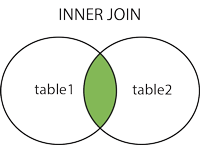
An inner join is used to have the result table display the records from the left and right table which have a common field between them. Anything that doesn’t match won’t be returned.
select book.book_id, author.first_name
from book
inner join author
on book.author_id = author.author_id;

Our result has fetched us only the books which have a corresponding author_id which exists in the author table. Note that books 13-15 have a null author, so we do not see them in our result set.
Left Join
A left join is used to produce a resulting table that has records from both tables that match as well as the values that exist solely in the left table.
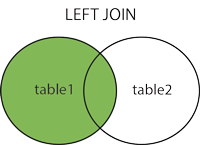

Unlike the inner join, our result set for the left join has all of our books in it, even the ones which don’t have an actual value for author_id. Why? Because the left join is returning the values from the left table-which is books in this case, as well as the values that existed in our inner join. It ignores any values from the right table which don’t match the left table. In this case, all our authors do have at least one book in the system, but it can become much more noticeable with larger databases.
Right Join
A right join is the opposite of a left join; it will return the records from both tables that match as well as the right table’s records.
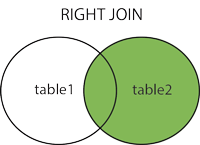

In our results, we’ve fetched the records that matched between the tables, 1-12 of our books as well as a null book_id for H.P. Lovecraft from our right table, our Author table. He only showed up here because he didn’t have a book for the left join or inner join, but he appears for the right join because he is in the right table only.
Full Join
A full join will return records from both tables, regardless of any common fields between them. It is like combining a left and right join.
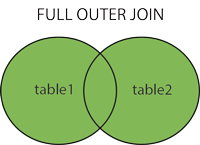

*whistles* That’s one large table! That is because it’s encapsulating all of our records from both tables, without worrying about the foreign key between the two tables. We’re getting H.P. Lovecraft despite him not having any books in the book table and we’re getting the three books which don’t have an author in the author table as well as all of the other books which have authors properly.
A full SQL file for creating the database used in this blog can be found on my Github here: https://github.com/salkiduckyJUMP/sql-demos/blob/master/Joins%20Example%20Blog%20Demo.sql
Further information on joins can be found here: http://www.sql-join.com/sql-join-types
Venn Diagrams sourced from https://www.w3schools.com/sql/sql_join.asp
Comparison in Java
In Java there exists ways to compare items. I recently came across the question of what these ways are and how they work. For this purpose, this blog will be focused on describing the three techniques of comparison in regards to comparing Strings and by the end, we should both have a better understanding of how they’re different and when you would choose one method over the others.

Using the == Operator
The == operator will only compare references, not the values themselves. Here is an example.
public class Comparison {

	public static void main(String[] args) {
		String sA = "Hello";
		String sB = "Hello";
		String sC = new String("Hello");

		System.out.println(sA == sB);
		System.out.println(sA == sC);

	}
}
When executed, the console shows as such: this is because the first print statement is comparing if sA and sB share the same reference which they do, so it turns out true. The second print statement is comparing if sA and sC share the same reference and they do not, so it turns out false.

Using the Equals() Method
The Equals() method compares values for equality, making it great for authentication. It is automatically defined for every class you create because it is defined in the Object class of Java. Let’s see it in action.
public class Comparison {

	public static void main(String[] args) {
		String sA = "Hello";
		String sB = "Hello";
		String sC = new String("Hello");
		String sD = "Goodbye";

		System.out.println(sA.equals(sB));
		System.out.println(sB.equals(sC));
		System.out.println(sC.equals(sD));
		System.out.println(sA.equals(sD));
	}
}
This is the output; note that regardless of reference, as long as the values are equal it will turn out true.

Using the CompareTo() Method
Where the previous two options returned a boolean, the compareTo() method that is included in the Comparable interface differs in the fact that it will return an integer value to indicate if the first String is less than, equal to or greater than the second String. It determines which value to return based on the Unicode value of each character between the two strings. If the two Strings are equal, it will return 0, if the first is less than the second it will return a negative number and if the first is greater than the second, it will return a positive number. You would want to use the compareTo() method when you need to sort Strings. Here’s an example.
public class Comparison {

	public static void main(String[] args) {
		String sA = "Hello";
		String sB = "Hello";
		String sC = "Goodbye";
		String sD = "Salutations";

		System.out.println(sA.compareTo(sB));
		System.out.println(sA.compareTo(sC));
		System.out.println(sC.compareTo(sA));
		System.out.println(sD.compareTo(sB));
	}

}
Since sA is the same value as sB, “Hello”, it returns as 0. Next sA is compared to sC and since “Hello” is greater than “Goodbye” we get 1. On the flipside, when we compare sC to sA, we get -1 since “Goodbye” is less than “Hello.” Finally we compare sD to sB and we get 11 since Salutations is 11 less than Hello, alphabetically.

In conclusion, you’d want to use the == operator when you want to compare if Strings have the same reference, the equals() method when you want to check that String values are the same such as for authentication and compareTo() method would fit best when you want to sort your objects.
Source: https://www.javatpoint.com/string-comparison-in-java
The Full Code on GitHub: https://github.com/salkiduckyJUMP/String-Comparison-Demos
The Anomaly of Marker Interfaces
Recently, I was posed the question of “how can you declare a marker interface in Java.” This question lead me to a second question of “what is a marker interface” because the term was new to me, which was exactly the question that I ran to Google with. Surprisingly, the answer lead me to realize that I had actually come into contact with marker interfaces before, and so have you in all likelihood.
A marker interface could be more aptly called an empty interface because in reality it is just that– an interface with no methods or fields. Where I had experienced this kind of interface was with native interfaces included in Java packages; Cloneable is an example from the java.lang package and so is Serializable from the java.io package. These interfaces are empty and a class which implements these empty interfaces essentially tells the program that “I’m able to be cloned” or “My state can be saved to a file.” Marker interfaces are used in a way different from most interfaces in that they imply, or mark, that the class implementing that interface should be given some special treatment.
So…Can we create our own marker interface? Of course we can! Let’s make our own simple marker interface now.
First we create our empty interface, I named it MarkerInterface for simplicity.
public interface MarkerInterface {

}
Next we have a class which will implement MarkerInterface.
public class ClassImplementing implements MarkerInterface{
    //Stuff could be written here
}
Lastly, we have our main class which has our main method in it. Before the main method, we have a method which will test if the class instance we call on uses MarkerInterface or not. Then in our main method, we create an instance of ClassImplementing, then we invoke the method isMarkerInterface on the instance of ClassImplementing.
public class MarkerInterfaceFunctionality {

	static void isMarkerInterface(Object object) {
		if (object instanceof MarkerInterface) {
			System.out.println("This object is an instance of MarkerInterface!");
		}
	}
	public static void main(String[] args) {
		ClassImplementing classImplementing = new ClassImplementing();
		isMarkerInterface(classImplementing);
	}

}
Running the program will get us this response sent to the console, since ClassImplementing does implement MarkerInterface. If it didn’t, we wouldn’t get this message.

To answer the questions I posed in the introduction, a marker interface is a way in which you can separate your code and tell your program to treat classes which implement the interface differently from those that don’t. To declare a marker interface, you simply need to declare an interface which has no fields or methods inside of it–an empty interface.
SOAP and REST
In today’s age, there’s almost no debate that web applications are some of the most important applications around. One of the components of a web application is what web services it utilizes. In a nutshell, web services are self-contained, available over the Internet and are not tied directly to any single programming language or operating system. So where does the title of this blog come in? SOAP and REST are two of the most often used API(Application Programming Interface) paradigms and often are mentioned in the same breath, but they’re very different from each other.
What exactly is an API? An API is like a plug adapter–it connects one application into the data and services of another application by granting it access to specific parts of a server. It simply lets two pieces of software communicate; you probably use an API once every few minutes as you browse your smart phone or check out blogs or videos on your laptop.
Simple Object Access Protocol

SOAP is a communication-based protocol that’s used to communicate over the internet. It provides data transport for web services and is able to exchange complete documents or just call a remote procedure. It works on any platform and in any language. It offers a high level of security to keep messages private if your individual application need them and has built-in ACID compliance by reducing anomalies and maintaining integrity of databases by setting out standards and rules for exactly how transactions can and should interact with the database.

REpresentational State Transfer

REST on the other hand, is a fully “web services” based API. Where SOAP is a protocol, REST is an architectural style for developing web services. It is more easily compared to the idea of Java design patterns as REST can be thought of simply as a “design pattern” for APIs. REST APIs can even make direct use of SOAP! REST is appealing to developers due to how simple it is and that it’s built upon features that already exist such as features of the Internet’s HTTP (Hypertext Transfer Protocol) to achieve its goals. There are certain items that a web service needs to include to be considered a RESTful API; it should have a uniform interface, have client-service separation, is stateless, have a layered system and be cacheable. It is lighter-weight than SOAP and is usually the more popular choice of the two.
In this blog I went over a pretty broad description of SOAP and REST but there is no doubt you’ll hear about them more. For more information please visit these sites:
Spring vs Spring Boot
Hello, welcome back! I’m sure you’ve noticed that this blog has been…haphazard to put it lightly. I’ve moved around from Java to Git to SQL, and now Spring and Spring Boot? Why-? In the interest of transparency, this blog has been a side effect/result of a training program I’m in. I’ve been trying to treat it not just as an assignment and make it interesting, but it has been points given in an exam here and there.
Also as part of that training program, we were asked to install Spring Tools Suite 4 for Eclipse, which I did and have been using for the last few weeks. I never asked what “Spring Tools” meant back when I installed it, nor did I ask what it meant while I’ve been developing programs in it, but recently we’ve gotten to that topic in class, as well as Spring Boot and how to write a SOAP webservice and a RESTful API(Possible blogs to come on their own!) Knowing about Spring and Spring Boot when developing webservices can be quite useful, but it can be hard to know when to draw the line between the two, and with how prevalent they’ve become in recent years, it’s bound to come up in a perspective full-stack developer career. Let’s check out what they are and the differences now.

Spring Framework
Spring is a very popular Java Enterprise Edition framework used to build applications. It offers not only a wide range of features and focus on many areas in an application, but overall offers a complete and intense infrastructural support for developing Java applications. Possibly the biggest feature offered is dependency injection, which allows developers to create loosely coupled applications, making development much simpler overall. In total, a goal of Spring is to simplify the Java EE development, helping developers be more productive as they work on applications.
Features of Spring:
- Dependency Injection
- Spring MVC Framework
- Spring MVC Test
- Validation
- Type Conversion
Spring Boot — What’s Different?
In a fashion akin to how Spring came to be-trying to solve problems with developing Java EE applications, Spring Boot was created to fix some problems with Spring. Spring was awesome with it’s capabilities, but it still required quite a bit of slow, awkward work to set up basic projects because the Spring MVC(Model-View-Controller) provided only basic functionality. While Spring was extremely flexible in options for developers, Spring Boot is an extension of Spring which aspired to make it even simpler to develop web applications while greatly shortening code length for the same functionality, often with less work involved. In shorter terms, Spring Boot eliminates need for the cumbersome boilerplate code needed to build Spring applications.
Special Features of Spring Boot:
- Autoconfiguration
- Annotation Configuration
- Default Code
- Properties Files
- Application events and listeners
In conclusion, the Spring and Spring Boot frameworks make it easier to create dynamic, enterprise applications online.
 Rebecca Hull's Wordpress