Exceptions are a topic in Java that caused me some confusion in the beginning. All I understood for a while was it was a thing you’d have to deal with by adding a try/catch block or by adding a ‘throws’ keyword to a certain kind of exception. I wouldn’t be able to really explain in human language what it is though and that’s not a good position to be in if you had to do a coding-style interview, knew you had to catch an exception and not be able to explain why or what exactly you’re doing to the interviewer. Writing this blog(reading it for your side!) should certainly avoid that problem!
An exception seems similar to an error on the surface: it’s an unwanted event that disrupts the expected flow of a program at run time. In this definition, you can think of an error as being an unofficial type of exception as an error will certainly disrupt the normal flow of a program when you try to execute it!
There are two accepted types of exceptions: checked and unchecked exceptions.
Checked Exceptions are…
checked at compile time
handled by using try-catch blocks or by declaring the throw keywords
Unchecked Exceptions are…
not checked at compile time
direct sub-classes of the RuntimeException class
occur most often as a result of bad data given by the user in an interaction
up to the programmer to decide how to react to these possible bad conditions in advance so the program can handle them correctly
This has been a really quick and dirty look at exceptions. Exceptions are an unwanted event that can throw your program off it’s intended flow. There are two kinds of exceptions, one that is checked at compile time and one that isn’t.
In a previous blog( in an early year of a decade not too long before our own…) I described the concept of polymorphism in Java, focusing on one of the types of polymorphism exclusively, method overriding. I did mention method overloading, the other type, and gave you a link to explore it on your own. If you did, great job for following up on your curiosity! If you didn’t…That’s perfectly fine too! Sometimes you don’t need to know every way to do things but you can fix that now because I feel that it’s a gap in my blog I need to fill. So let’s get started!
First, let’s do a quick review of polymorphism. Polymorphism is one of the four pillars of object-oriented programming, which means ‘many forms’. It can occur through the use of inheritance, which allows subclasses to inherit methods and attributes from other classes. Method overriding happens when a subclass provides a special signature for the method inherited from a class at run-time. Full details on method overriding can be found here.
Method overloading, on the other hand, is when different methods can have the same name but different signatures, namely type and number of input parameters. Let’s check out an example so we can compare it to the link above’s method overriding example.
First we need a class to define our methods in, I called it Feline for this example.
public class Feline {

	public void describe(String name) {
		System.out.println("I am " + name + ". I am a large
                orange cat with black stripes!");
	}

	public void describe(String name, String color, String markings) {
		System.out.println("I am " + name + ". I am a small
                " + color + " cat with " + markings + "!");
	}

}
As you can see we have two methods that send a line to the console to be displayed; one has one parameter and the other takes three parameters. The twist here, is that they’re both the same method name of describe!
Moving onward, we make our main class, which I call CrazyCatLady. Who else would have both a tiger and normal housecats after all? Here we create a new Feline object and invoke our methods.
public class CrazyCatLady {

	public static void main(String[] args) {
		Feline obj = new Feline();
		obj.describe("Rahjah");
		obj.describe("Berlioz", "dark gray", "lighter gray chest");

	}

}
As you can see, we pass a string into the first describe method and the three strings into the second describe method. Execute the code and this is what we get in the console:
First line is from the single-parameter signature of the describe method and the second line is from the multiple-parameter signature of the describe method.
I’m going to be honest with you, dear reader. I began writing this blog not really fully understanding this concept myself! Through an accidental writing of this code in the form of an overriding polymorphism(whoops!) and the successful writing of this one I now understand the difference between the two pretty well. The main things to remember about method overloading vs overriding is that overloading concerns the use of special method signatures that have a different number of parameters and that the choice between the two methods will occur at runtime of the program.
If you’re looking at this blog, you’ve likely written programs dealing with data. What if your data set is so long that it starts to become impractical to hard code all of it? That’s where XML files become a strong option to store all that data in a practical way. To make use of these files full of so much data, you need to choose an API to read, and in some cases, update and edit that data. Let’s check a few popular ones out now.
SAX(Simple API for XML) is a ‘read’-only API. You can only access and fetch pieces of data from the XML file. It’s a ‘push’ processor streaming API which does it’s work with the use of callback methods. SAX is fairly convenient to use in that it is fast and memory efficient, but it can become complex easily.
DOM(Document Object Model) is a ‘read and write’ style API. This API represents the entire XML document as a tree in memory. This makes DOM an attractive option for when you’re going to be searching the tree for individual elements. A downside is that it has a tendency to slowdown and be extremely memory sensitive, particularly when dealing with very large sets of data.
JAXB(Java Architecture of XML Binding) is the last API we’ll check out in this blog. Like DOM, it’s capable of reading and writing the data however it structures the XML it processes in an entirely different way. It draws the structure using annotations which are generated from XML schemas. It stores the entire document in memory to access quickly, however it doesn’t handle extremely large data sets as well as SAX.
In conclusion, there are a variety of XML parsing Java API’s out there and it’s important to consider the pros and cons which come with the use of all of them. In a majority of projects today, it’s my understanding that JAXB is the best choice, but that doesn’t mean it’s the end-all, be-all.
XM-What now? XML stands for Extensible Markup Language. By using tags, the XML file can be read easily by both computers and humans. You might think that it’s also similar to HTML(Hypertext Markup Language), but the difference is all in the name; XML is extensible. Users can create their own markup symbols in XML, there is no predefined language. The major use of XML is to store data; HTML, however, is utilized to present data.
Let’s analyze and define segments to a XML document.
First, you will normally have an XML Declaration, which is used to declare a file. You don’t need to use a declaration, but it can be important to have.
Next we have the XML Elements, common logical components of the document. These
The next important value to keep in mind is Attributes. Attributes are the actual values given to each element.
In conclusion, XML documents are important to store data in a logical way.
The adapter design pattern is a structural pattern which allows two interfaces which wouldn’t be able to work together actually work together. It does this by wrapping the “adaptee” with a class that is supported by the main interface.
Let’s take a look at a coded example, which uses video game enemies as the objects.
First we have our main interface of EnemyAttacker.
public interface EnemyAttacker {

	public void FireWeapon();
	public void driveForward();
	public void assignDriver(String driverName);
}
Next we have a class representing an EnemyTank which implements the EnemyAttacker interface.
import java.util.Random;

public class EnemyTank implements EnemyAttacker {

	Random generator = new Random();

	@Override
	public void FireWeapon() {
		int attackDamage = generator.nextInt(10) + 1;
		System.out.println("Enemy Tank Does" + attackDamage + " Damage");
	}

	@Override
	public void driveForward() {
		int movement = generator.nextInt(5) +1;
		System.out.println("Enemy Tank moves " + movement + " spaces.");
	}

	@Override
	public void assignDriver(String driverName) {
		System.out.println(driverName + " is driving the tank");
	}

}
Everything checks out, the EnemyTank inherits and defines fully the methods from the interface. But what if we have an Enemy object that doesn’t have a driver? Or a weapon to fire? Or what if it doesn’t even drive forward? Well that’s exactly what we want to implement next; an EnemyRobot. Clearly it doesn’t inherit the same kind of methods that EnemyTank should. What can we do? We create an adapter class which helps the interface for EnemyRobot and EnemyTank work together, like so!
public class EnemyRobotAdapter implements EnemyAttacker {

	EnemyRobot theRobot;

	public EnemyRobotAdapter(EnemyRobot newRobot) {
		theRobot = newRobot;
	}

	@Override
	public void FireWeapon() {
		theRobot.smashWithHands();
	}

	@Override
	public void driveForward() {

		theRobot.walkForward();
	}

	@Override
	public void assignDriver(String driverName) {
		theRobot.reactToHuman(driverName);
	}
}
Here we are able to override the non-compatible methods from EnemyAttacker and implement our own methods that apply to the RobotAttacker, defined in the following class of EnemyRobot; the Adaptee.
import java.util.Random;

public class EnemyRobot {

	Random generator = new Random();

	public void smashWithHands() {
		int attackDamage = generator.nextInt(10)+1;
		System.out.println("Enemy Robot Causes " + attackDamage + " With Its Hands.");
	}

	public void walkForward() {
		int movement = generator.nextInt(5) +1;
		System.out.println("Enemy Robot Walks Forward " + movement + " Spaces.");
	}

	public void reactToHuman(String driverName) {
		System.out.println("Enemy Robot Tramps on " + driverName);
	}
}
Finally, we have our main class. In our main method, we create both a EnemyTank and an EnemyRobot, which both use the same methods that were implemented from EnemyAttacker.
public class TestEnemyAttackers {
	public static void main(String[] args) {

		EnemyTank rx7Tank = new EnemyTank();

		EnemyRobot fredTheRobot = new EnemyRobot();

		EnemyAttacker robotAdapter = new EnemyRobotAdapter(fredTheRobot);

		System.out.println("The Robot");

		fredTheRobot.reactToHuman("Paul");
		fredTheRobot.walkForward();
		fredTheRobot.smashWithHands();

		System.out.println("The Enemy Tank");

		rx7Tank.assignDriver("Frank");
		rx7Tank.driveForward();
		rx7Tank.FireWeapon();

		System.out.println("The Robot with Adapter");

		robotAdapter.assignDriver("Mark");
		robotAdapter.driveForward();
		robotAdapter.FireWeapon();
	}
}
To see the full project code, visit this project on my GitHub here!
Alright, so you’re going to create a program but let’s say there’s a catch; you have several classes which may or may not be needed. Maybe you have a complex class on your hands or your classes are costly to instantiate. What’s a programmer to do-? Looking at the Gang of Four list, one pattern comes up at the top–the prototype!
A creational pattern, the prototype design pattern creates an independent clone by making a new object which copies all of the properties of an existing project.
Let’s look at an coded example using the prototype pattern. First we have our Animal interface. In order to use the prototype pattern, our interface extends the Cloneable interface from the Java library.
public interface Animal extends Cloneable {

	public Animal makeCopy();

}
Next we create a CloneFactory class which takes elements that follow the Animal interface and returns the copy.
public class CloneFactory {

	public Animal getClone(Animal animalSample) {

		return animalSample.makeCopy();

	}

}
Next we have the class Sheep which implements Animal. It overrides the inherited method makeCopy() and returns an object.
public class Sheep implements Animal {

	public Sheep() {
		System.out.println("Sheep is Made");
	}

	@Override
	public Animal makeCopy() {

		System.out.println("Sheep is Being Made");

		Sheep sheepObject = null;

		try {
			sheepObject = (Sheep) super.clone();
		} catch (CloneNotSupportedException e) {
			e.printStackTrace();
		}

		return sheepObject;

	}

	public String toString() {
		return "Dolly is my hero, baaa";
	}

}
Next we have TestCloning which is our main class; within the main method we create a sheep and a clone of the sheep. To prove we’re not just getting differently named but the same objects, we also display the hashcode for both ‘Sally’ the sheep and her clone.
public class TestCloning {

	public static void main(String[] args) {

		CloneFactory animalMaker = new CloneFactory();

		Sheep sally = new Sheep();

		Sheep clonedSheep = (Sheep) animalMaker.getClone(sally);

		System.out.println(sally);

		System.out.println(clonedSheep);

		System.out.println("Sally Hashcode: " + System.identityHashCode(System.identityHashCode(sally)));

		System.out.println("Clone Hashcode: " + System.identityHashCode(System.identityHashCode(clonedSheep)));

	}
}
Design patterns are an interesting concept in that you may have used a few of them without ever knowing it! I know some of the coding examples that I’ve seen have been pretty familiar to codes I’ve created and studied before. As the title above states, design patterns were simply created to be typical solutions to common problems that software engineers might face.
The foundation set of 23 design patterns can be referred to as the Gang of Four patterns. They are referred to as such because the design patterns can be found in a book which was authored by four separate authors– “Design Patterns: Elements of Reusable Object-Oriented Software” . The Gang of Four patterns are not only important to recognize as solutions but also to understand how they avoid the pitfall that each pattern was created to avoid. Your first question when looking at a design pattern for the first time shouldn’t necessarily be “How does this pattern work? but instead “What problem prompted the creation of this?”
The Gang of Four patterns are separated into three categories:
Behavioral – patterns which lay out the way that classes and objects should communicate
Creational – patterns which give ways to instantiate objects or groups of objects define manners of communication between classes and objects.
Structural – patterns which give a framework to define relationships between classes or objects
Aaaand that’s a general overview of the Gang of Four design patterns! For more information you can see the following sites. I’ll be writing a few blogs dedicated to some specific design patterns soon as well, so keep an eye out!
It was possibly not my best move to jump into the explanation of a SQL keyword on my first post regarding databases, so let’s take a step back and really analyze some general facts surrounding databases.
What is a Database?
a structured set of data held in a computer, especially one that is accessible in various ways.
Google Dictionary
Database is a systematic collection of data
Guru99
That’s what a few sources say about databases; what do I say? Essentially both these definitions are correct. You’ve probably accessed, come across and even be a part of a database dozens of times without realizing it, in fact. Ever log into a website? Extremely likely if you’ve found yourself here–the website likely has a database of users who have a username and a corresponding password. When you log in, the website needs to check with the server to make sure you’re using the correct credentials for the account you’re trying to log into. Essentially you can think of the website itself, as in the part you access and see, as the front end and on the back end the database lives full of data that’s pulled by the website to show you certain results.
Tables; Can’t Live Without Them
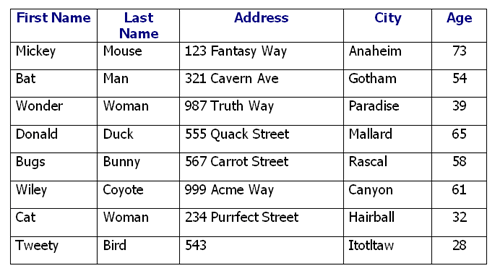
A database can have many different tables. So what is a table? It’s a collection of related data. It’s essentially how the database stores and organizes data. Let’s look at one.
In this case, it’s a table containing information on fictional characters, including their names, addresses and age. Each of these columns is an attribute. On the other hand each row is a record, commonly referred to in the database world as a tuple. The third row can be read that the record has the value Wonder for the First Name attribute, the value Woman for the Last Name attribute, 987 Truth Way for the Address attribute and so on.
Schemas; The Backboneof Your Database
A schema is another important thing to keep in mind when looking at databases. You can think of a schema as the frame of a house you’re building. When you’re building a house, the frame shows where the windows are, the doors, how far apart they are, how tall the walls are and other information about the structure. In the same way the schema can show the organization and structure of your database.
A schema can contain tables, columns, data types, views, stored procedures, and so on. It’s okay if you don’t know what all these terms mean if you’re a beginner to databases. It’ll all come with time–maybe down the road I’ll write more about schema-objects.
Entity Relationship Model
Falling in line with the Entity Relationship Model, data is viewed as entities, attributes and relations that exist between those entities. Entities can be related to real-world objects that are distinguishable from other objects; such as people(relatively speaking) in our table example above. Entities are described by using their attributes, such as First Name in our table above. The relationship is simply the two-dimensional table but more so it is a link that relates one or more entities that share one or more tables.
ER design model is important to keep in mind as it’s the model followed by relational database management systems like MySQL which help to create and manage databases!
Relationship Types
Your relationship is ___ if ….
One to One: If a record from table one can only be related to one item from table two; like a person can only have one social security number and a social security number can be tied to only one person.
One to Many: If a record from table one can be related to many items from table two; like a person can be the owner of many dogs and many dogs can have the same owner.
Many to Many: If many records from table one can be related to many records from table two, like multiple authors can write multiple books and multiple books can be written by multiple authors. Note that ‘many’ in this definition just means more than one.
When you get into it, SQL commands are pretty powerful. You can add, edit and delete pieces of data at whim. The command to create tables to hold this data is create while working in a relational database management system(RDBMS). ..What was that noise? The sound of your MIND BLOWING? Ha, but seriously, in a lot of cases commands can be pretty self descriptive. Create requires a few details:
the name of the table you’re going to create
names for each of the fields(remember, fields are represented by columns in database tables)
definitions for each field (what data type the field’s values will be in)
Let’s go through a quick example. Feel free to copy the following into MySQL or other RDBMS and run these queries.
 create database pokedex;
 use pokedex;

 create table pokemon (
  pokemon_id int NOT NULL PRIMARY KEY,
  pokemon_name varchar(50),
  no_evolutions int
  );

 select * from pokemon;
In the first line, I create my new database-Pokedex. Keep in mind that you have to specify which database you are using with the use keyword before you create your new table or it will be created in the last used database.
Next we get down to creating our table! We call the table pokemon’ and within the parentheses we specify our column names; pokemon_id, pokemon_name and no_evolutions. Following the name of each column we tell the table what kind of data values will be stored in it. If you run this complete query sequence in MySQL, you will see your new table created with the rows you specified in your result grid view!
If you’ve seen my Java Interview Questions blog, this blog is essentially the same idea but for Database/SQL related questions. These are questions that I feel could be a little tricky if you’re asked it and can’t think of the right terms and keywords to respond with.
What does SQL stand for?
Structured Query Language
Example of horizontal expansion
Adding more servers rather than a bigger server
What is a schema?
skeleton/blueprint describing the database structure
What are the two kinds of query language?
Database query and information retrieval query
What relationship does an entity have with an attribute?
An entity represents a real-world object and an attribute represents a trait of that object. For example, an entity could be a dog and the attribute can be the dog’s name, dog’s fur color or dog’s markings.
Give a real world example of a many-to-many relationship.
A student can study many subjects and a subject can be studied by many students.
What is a relation modeled by in a relational model view?
A table
Name the three components of the relational model.
Tuples, Attributes, Relational
What is the purpose of normalization?
Reduce redundancy
Describe 1NF, 2NF, 3NF.
In 1NF, you make the table have only atomic-values; that is every column should hold only one value. In 2NF you remove any partial dependencies from the table and move them into a new table with the primary key. In 3NF you remove any transitive dependencies from the main table and make them their own table.
Which SQL statement type deals with managing data in the schema object?
DML-data manpulation language
Name the three kinds of SQL Statements and describe what they each do.
Data Definition Language is used to define the database schema.
Data Manipulation Language is used to manage data in the schema.
Data Control Language is used to secure the database by granting and revoking permissions.
What is SQL Injection?
A code-injection technique in which malicious SQL statements can be inserted for execution.
Q2.
What are the different subsets of SQL?
Data
Definition Language allows you to create, alter and delete objects
in your database, mainly tables; you’re defining the schema when
you utilize these commands
Data
Manipulation Language allows you to access and play with the actual
data stored in objects
Data
Control Language allows you to control who has access to your
database and how much they can access the data within; think
multiple users with separate permissions
Consider two tables. A foreign key in Table B references the primary key of Table A. The foreign key is a link between the data stored in those rows. The FOREIGN KEY keyword helps to prevent actions that would dismantle the link. You can think of it as a fail-safe.
An
index is a database object which allows a query to access data faster
and more efficiently; it’s power is especially noticeable in larger
databases.
Unique Index doesn’t let the field have duplicate values; every row in the table or view affected will be unique in some way. A unique index can be automatically applied on the primary key if it exists.
Clustered Index reorders the physical order to search a table or view based on the index key values. Each table can have only one clustered index.
Non-Clustered Index on the other hand doesn’t reorder the data rows; it maintains it’s original order of data. Each table can have as many non clustered indexes as needed.
Q21. What
is the difference between DROP and TRUNCATE commands?
The DROP command essentially deletes the whole database or table specified. Your database or table won’t exist anymore after using the DROP command on it.
TRUNCATE, on the other hand, removes all of the existing rows from a table all at once. This means you can create new rows without needing to regard the ‘old’ ones because you’ve removed them. It’s also more efficient than using the DELETE command to delete rows because it is logged as one action instead of deleting row A, deleting row B, and so on.
Atomicity ensures that a transaction(an operation on your data) must either completely pass or completely fail; you won’t get a transaction that worked halfway but still changed data. For any data to be affected by the transaction, it must work entirely.
Consistency makes sure that all data entered meets validation rules. Only data that follows these defined rules can be written to the database.
Isolation makes sure that multiple transactions can run at the same time independent of each other: that is, accessing or updating a record in a table won’t affect another transaction of a different record in that table. It also means that a transaction cannot read from an incomplete transaction until it is finished.
Durability makes sure that if a transaction is committed, it will go through the system no matter what outside force(power loss, crash or errors) might occur.
Q27.
What is the difference between cross join and natural join?
A natural join is a
join which occurs with a WHERE clause where it is based on the tables
having columns which contain the same name and data types in both
tables. A cross join is a basic join without a WHERE clause; it gives
you the cross product of the two tables.
There are two
general kinds of subqueries; correlated and non-correlated. In a
correlated subquery, it executes one time for each row of the outer
query—it’s dependent on the outer query. On the other hand,
non-correlated subqueries exist where the query is independent; the
output of subquery is substituted in the outer query.
The MERGE statement
is the combination of the INSERT, DELETE and UPDATE statements all in
one; it can make changes in a table based on values that match
another table.
Scalar
functions return a single value based solely on the input value,
aggregate functions also return a single value but only after
performing some calculations on a set of values.
Q53. What
is the main difference between SQL and PL/SQL?
SQL is a query language that will execute a single query at a
time; PL/SQL is basically a souped up extension of SQL that is a
procedural language which can excute an entire block of queries at
once.
A data warehouse is a core repository that resources data from
many different sources of information. The main reasoning for a data
warehouse is to make reporting and analysis of the data more
manageable.



 Rebecca Hull's Wordpress