Part of a Collaboration with Lee Angioletti and Daniel Krueger
Database is one of those weird key terms, isn’t it? One of those words that tends to get thrown around by people with little actual understanding. At least that’s how it seems to me, it’s always been a general term with little meaning. It might be that way to you but databases can be more complex than you might imagine.
So what exactly is a database? In layman’s terms, a database is a collection of information that’s organized so that a computer program can easily access certain pieces of data. Relationships between this data can be represented in a table; with rows(tuples) and columns which represent the attributes of your data elements.
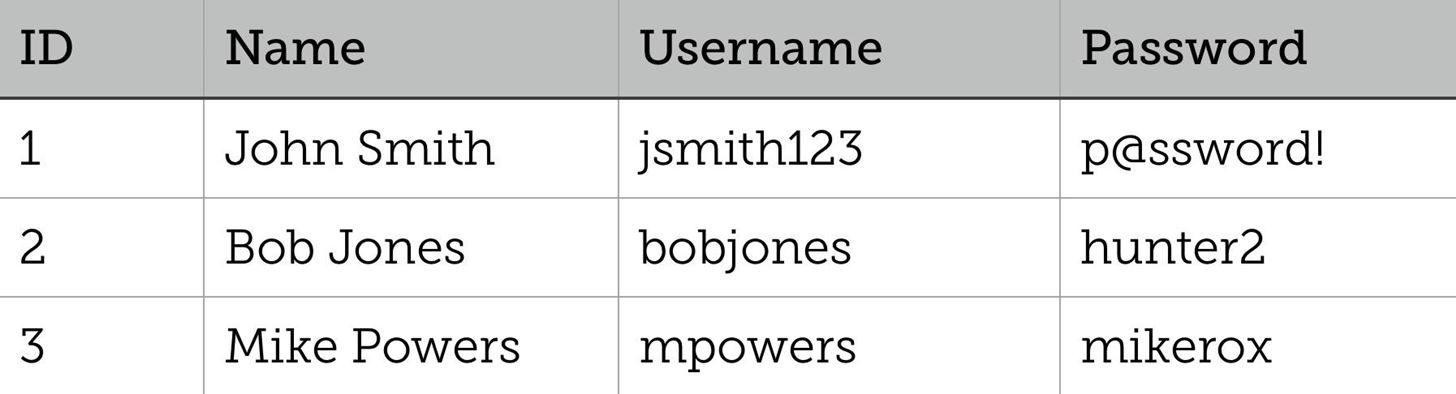
Of course the above table is rather simple, with only a few attributes and only a few members. A problem arises once you get larger tables with many members and attributes that depend on each other. Take for example, the following table.
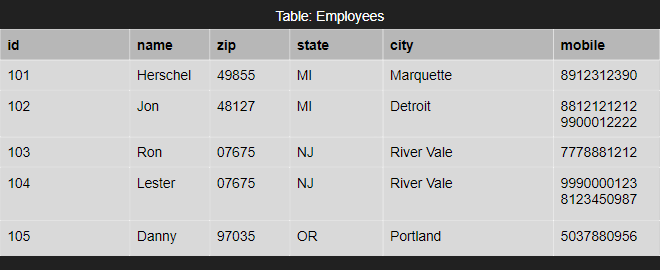
Notice a few things different about this table compared to the username/password table above. That table had every attribute of every member be different. Everyone had a different username or password, it was straight forward because everyone only has a singular username or password in that instance. In this table something different happens with mobile; people can have more than one cell phone number and both Jon and Lester do in this table. Also notice that Ron and Lester share the same zip, state and city. There’s some redundancy in this data. To fix that, we use a process called normalization which goes through three steps.
First Normalized Form (1NF)
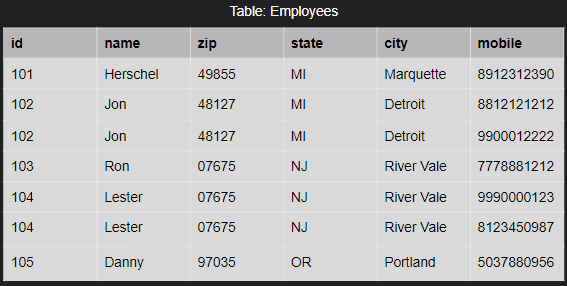
The rule of 1NF holds that an attribute of a table can’t have multiple values. Of course, our table currently has multiple values; Jon and Lester have two different cell phone numbers in mobile in our table. Let’s fix that and make each attribute be in it’s own row; each column has only a single value now.
Second Normalized Form (2NF)
I should point out now: you need to have your table in the previous normalized form to move onto the next. We have our table in 1NF, so we can do 2NF and then 3NF, but you cannot skip over 2NF if you wanted to go from 1NF to 3NF and so on.
Moving into 2NF also requires that we know a couple of definitions about a few kinds of dependencies.
- Functional Dependency: when the value of an attribute depends entirely on the value of another attribute
- Partial Dependency: Attribute depends on only part of the primary key
- Transitive Dependency: an indirect relationship between values in the same table; results in a functional dependency
Hmmm…yes. These words are made of words. Essentially, in our 1NF above, a functional dependency can be name which depends on id; each name value depends entirely on the id value to show the correct name.
To change our table, we actually need to identify any partial dependencies and then make a new table for those partial dependencies. Can you see a partial dependency in our 1NF table? I’ll give you a moment. ….Did you say the mobile on id dependency? That just so happened to be what the problem with multiple values too! So let’s turn our 1NF to 2NF.

Now we have two tables, one of Employee Information and one of Employee Contacts.
Third Normalized Form (3NF)
To transform our tables into 3NF, you need to remove transitive dependencies. What’s that exactly? Good news, if you’ve ever heard of transitive properties you’re halfway there! The transitive property holds that if A is greater than B and B is greater than C then we can say A is greater than C. The transitive dependency works in a similar way. How so? Let’s look at our Employee Information table. State and City are dependent on Zip code. Zip code is dependent on ID. Therefore, we can say that State and City are dependent on ID. Removing this transitive dependency also alleviates a logical consistency; Ron and Lester live in different cities and states, but share the same zip code in this example. Here are our tables in 3NF, Employee Information and Location Information.

Final Normalized Form

And that’s pretty much it! The main thought you should take away from this blog is that normalization is a process with the main goal to reduce data redundancy. More information can be found in these links: https://beginnersbook.com/2015/05/normalization-in-dbms/, https://www.lifewire.com/transitive-dependency-1019760.







 Rebecca Hull's Wordpress